
03 · Predict
Run the simulations your test matrix can't cover.
Ionworks gives battery R&D teams high-fidelity simulation for performance, degradation, and lifetime prediction, driven by real protocols and grounded in validated electrochemical models.
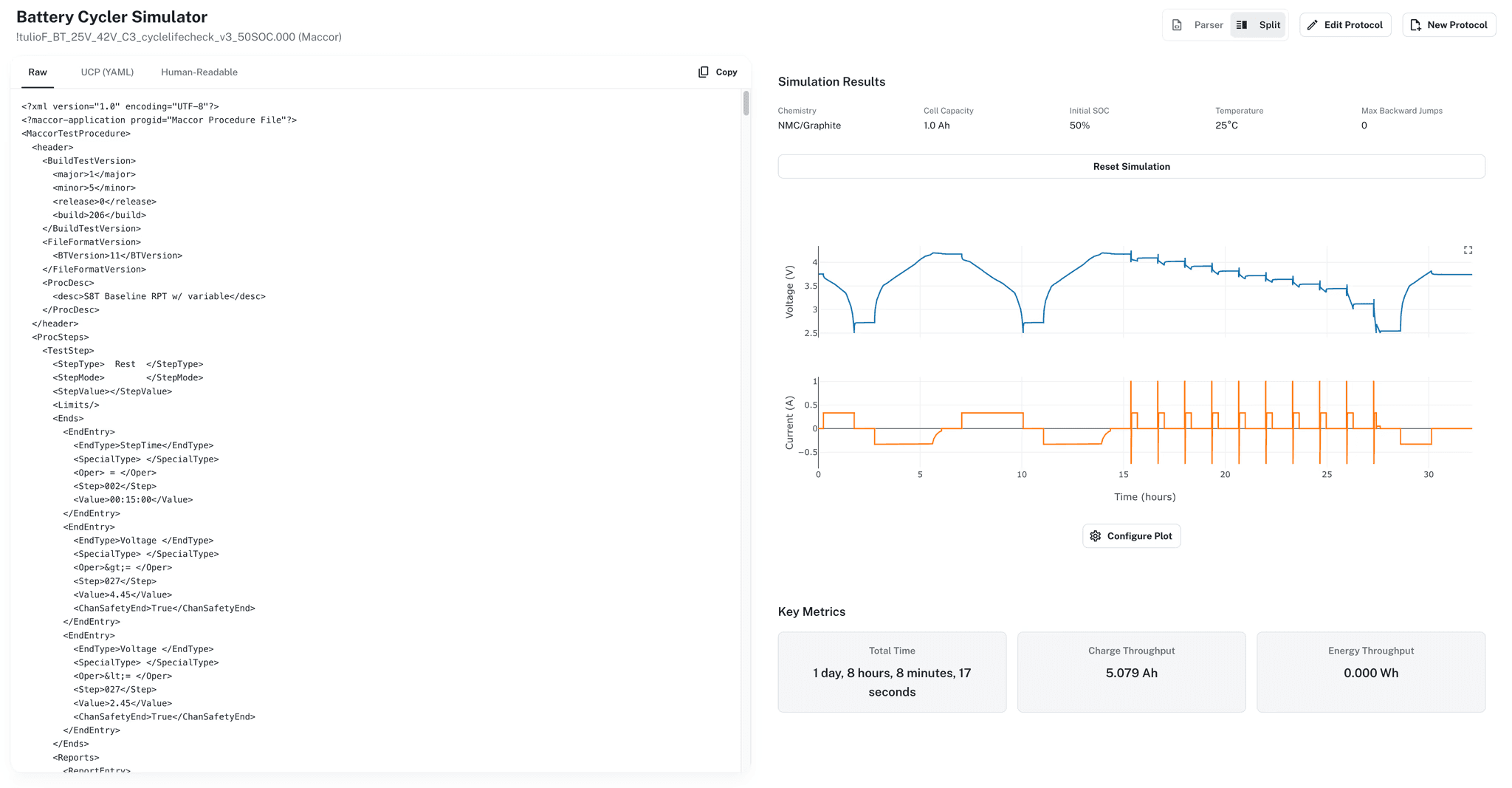
Protocols
·Maccor·Neware·Arbin·BioLogic·UCP
Built by the team behind PyBaMM, the most widely adopted open-source battery modeling framework.
The gap between a model that runs and a simulation workflow that works
Running a single simulation in a Jupyter notebook is straightforward. Running structured studies that a team can trust, reproduce, and build on is a different problem entirely.
01
Protocols live in engineers' heads, not in the system
A battery engineer knows the charge protocol, the discharge limits, the temperature range, and the duty cycle for a test campaign. That knowledge sits in a cycler program file, a lab notebook entry, or a Slack message. When a modeler needs to simulate the same protocol, they reconstruct it by hand: reading the cycler file, translating it into PyBaMM experiment syntax, guessing at details that were not recorded. Every reconstruction introduces the possibility that the simulated protocol does not match the physical test. When the model disagrees with the bench, the first question is always whether the protocol was specified correctly.
02
Simulation studies are hard to organize and harder to reproduce
A study that compares 20 protocol variations across 3 cell designs using 2 parameterized models generates 120 simulations. In a notebook workflow, each simulation is a script with hardcoded parameters. The results go into output folders with naming conventions that made sense to the person who created them. A month later, reproducing one result means finding the right script, the right parameter file, and the right version of the model. Reproducing the full study means doing that 120 times.
03
Design exploration requires infrastructure notebooks don't provide
Answering a question like 'what is the fastest charge rate that avoids lithium plating across a temperature range' means sweeping C-rates and temperatures against a validated model, checking plating predictions for each condition, and comparing results across the matrix. That requires parameter sweep logic, result storage, and comparison tools. Teams build this infrastructure from scratch in notebooks, and the infrastructure is rarely reusable across projects because the sweep dimensions, the comparison metrics, and the plotting code are all specific to the study.
What Ionworks provides
Protocol-driven simulation
Simulations run against real protocols, not abstract experiment definitions. Create protocols by typing or pasting text (in Universal Cycler Protocol format or native Maccor, Neware, BioLogic, and Arbin syntax), uploading a cycler file with auto-detected format, building visually with the Protocol Builder, or selecting from nine built-in experiment templates covering common test procedures from constant current discharge to cycle aging.
Studies as focused investigations
A study groups related simulations into a single workspace. Run simulations, compare results, and analyze outcomes within the study. A simulation can belong to multiple studies, and removing it from one study does not affect others. Studies are the unit of investigation, not individual simulation runs.
Design parameter sweeps
Override any scalar model parameter without modifying the parameterized model itself. Specify discrete values, ranges (min/max/count), or statistical distributions (normal). Sample with grid, Latin Hypercube, Sobol, or random methods. A sweep that explores coating thickness, porosity, and C-rate across a validated physics-based model produces structured results ready for comparison.
Automatic simulation reuse
If a simulation with identical inputs already exists, the platform returns the existing result instead of recomputing. Two engineers working in different studies who happen to specify the same model, protocol, and parameters see the same result. No duplication, no wasted compute, no ambiguity about whether two apparently identical results are actually identical.
Companion tool
Catch protocol errors before they cost you days of cycler time
The Battery Protocol Simulator validates your Maccor, Neware, and Novonix UHPC protocol files before they ever reach hardware. Verify currents, voltages, and step sequences in seconds.
How it works in Ionworks
01
Select a parameterized model and define a protocol
Start with a parameterized model from the Train stage: a specific electrochemical model type, a validated parameter set, and a cell specification bundled into a single configuration. The model's full provenance is attached, so the simulation links back to the fitting process and experimental data that produced the parameters.
Define the protocol. The Universal Cycler Protocol (UCP) is a YAML-based language for battery experiments with programmatic control: global settings (initial temperature, state, resolution), safety limits (voltage, temperature, current), step types (charge, discharge, rest, drive cycles, EIS), termination conditions, and reusable subroutines. Or upload a cycler file directly and let the platform translate it. Nine built-in templates cover common procedures from GITT to cycle aging.
02
Configure conditions and run
Set experimental conditions: initial state of charge, temperature, and any design parameter overrides for the sweep. For parameter sweeps, define the dimensions (which parameters to vary), the sampling method (grid, Latin Hypercube, Sobol, random), and the number of samples. Each combination produces a simulation with its inputs explicitly recorded.
Simulations run as background jobs with real-time status updates. Long-running studies with hundreds of simulations distribute across workers using Ray. Jobs support cancellation with cascading cancellation to child jobs. The platform checks for existing identical simulations and reuses results automatically.
03
Compare and analyze results
Results include interactive time series plots with configurable axes and secondary y-axis support. Overlay voltage, current, temperature, and capacity curves across simulations in a study. Voltage component breakdowns show OCV, ohmic losses, and reaction overpotentials separately. Each built-in experiment template auto-computes relevant metrics: capacity, energy, resistance, electrode potentials, capacity retention, and throughput.
Stack-cycles mode overlays cycles for degradation trend analysis. Filter by cycle range, step selection, or SQL-style queries against available columns. Every result links to its exact inputs: the parameterized model version, the protocol, the initial conditions, and the design parameter values.
04
Connect to optimization and team workflows
Simulation results feed directly into the Optimize stage. A study that identifies the most promising design region becomes the starting point for a targeted optimization. Teams use the Python SDK and REST API to script batch simulations, integrate results into existing analysis pipelines, or build custom dashboards.
Ionworks Studio provides the browser-based interface for configuring simulations, reviewing results, and sharing findings with team members who do not work in Python. Both interfaces operate on the same simulation records, the same studies, and the same parameterized models.
Frequently asked questions
Physics-based lifetime prediction
White paper · PDF
Calibrated on seven months of LG M50 aging data, a physics-based degradation model predicts the next six with a mean capacity error of 3.2 percentage points.
Get the white paper

Ionworks took an open-ended problem and helped us to quickly identify the best course of action, delivering a tailored model of our system. The team adapted flexibly as the problem statement developed.

Run the simulations your test matrix can’t cover.
See how teams use validated models to sweep conditions that would take months on a cycler.