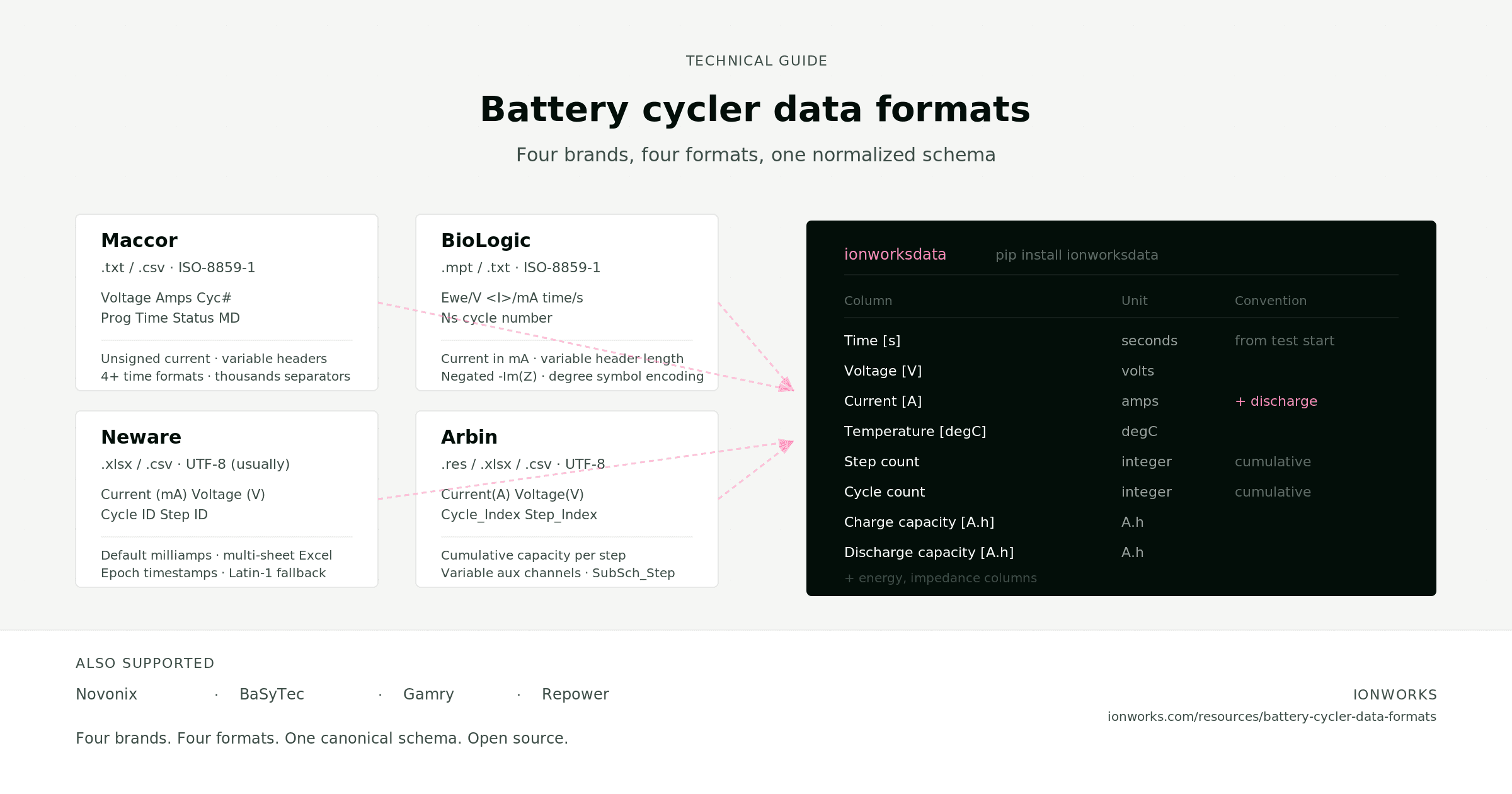
Every battery data pipeline hits the same wall. A team runs cycling tests on a Maccor, pulse tests on a BioLogic, impedance sweeps on a Gamry, and aging studies on a Neware. Each instrument writes its own file format with its own column names, unit conventions, and structural quirks. Before anyone can compare results or feed data into a model, someone has to write (and maintain) parsing code for each format.
This guide documents what we have learned from building and maintaining parsers for the major cycler brands. The details come from ionworksdata, the open-source Python library that powers the ingestion layer in Ionworks. Everything described here is running in production, and the library is available to anyone: pip install ionworksdata.
Format quick reference
| Cycler | Native format | Text export | Software | Column style |
|---|---|---|---|---|
| Maccor | Binary (.raw) | Tab-delimited .txt | MacTest / Maccor Export | Abbreviated: Voltage, Amps, Cyc# |
| Neware | .NDA (binary) | .xlsx / .csv | BTSDA | Units in parens: Voltage (V), Current (mA) |
| BioLogic | .MPR (binary) | .MPT (tab-separated) | EC-Lab | Slash notation: Ewe/V, <I>/mA, time/s |
| Arbin | .RES (MS Access) | .xlsx / .csv | MITS Pro | Verbose with units: Voltage(V), Test_Time(s) |
The native binary formats (.raw, .NDA, .MPR, .RES) are undocumented or partially documented. In practice, teams export to text. The parsing problems live in those text exports.
Maccor
File format
The Maccor Export tool produces tab-delimited .txt files (or .csv with commas). Select "Text Output" and "Tab Delimited" in the export dialog. The output includes a multi-line metadata header before the data rows.
Some Maccor setups also produce files with numeric extensions (.001, .002, .0011, etc.) that follow the same tab-delimited structure. Excel exports (.xls, .xlsx) are also supported.
Column names
Maccor's column names are terse and inconsistent across software versions. The voltage column might be Voltage, Volts, or Voltage (V). Current appears as Current, Amps, or Current (A). Time shows up as Prog Time, Test (Sec), Test Time (sec), or Test Time (Hr) depending on the export configuration. Cycle count might be Cycle, Cyc#, Cycle ID, or Cycle P.
Temperature columns follow auxiliary channel numbering: LogTemp001, or sometimes Temperature (°C) or EVTemp (C).
A status column (Status, State, or MD) encodes the test phase as a single letter: D for discharge, C for charge, R for rest. Longer status strings like DCH are truncated to their first character during parsing.
Maccor also exports capacity and energy columns in several naming variants: Capacity (Ah), Capacity (AHr), Cap. (Ah), with separate charge and discharge versions (Chg Capacity (Ah), DChg Capacity (Ah), etc.). Energy follows the same pattern.
Parsing gotchas
The header. A multi-line metadata block precedes the data. You need to detect where the actual column row starts, which varies by export configuration.
Unsigned current. Some Maccor exports report current as an unsigned value for both charge and discharge, relying on the status column to indicate direction. If your parser reads the current column without checking whether both charge and discharge rows have positive values, you will get the sign convention wrong. The ionworksdata parser detects this case: if both D and C statuses exist and all current values are positive, it negates current during charge steps.
Time format. Maccor exports time in at least four different representations: raw seconds, hours, Excel-style duration strings (:D:HH:MM:SS), and full timestamps in MM/DD/YYYY HH:MM:SS with optional AM/PM, or ISO-style YYYY-MM-DD HH:MM:SS. A parser that assumes one format will break on files from a different Maccor version.
Thousands separators. Some Maccor exports include commas in numeric fields (e.g., 1,234.56). A naive CSV reader will split on those commas. The ionworksdata parser strips thousands separators before numeric coercion.
Encoding. Files are typically ISO-8859-1, not UTF-8. Reading with a UTF-8 decoder will fail silently on some metadata characters or throw on special characters in test descriptions.
The Format Mask. Which columns appear in the export depends on the Format Mask selected at export time. A parser that hardcodes expected columns will fail when a team member exports with a different mask.
Neware
File format
The native .NDA format is a binary blob that requires BTSDA to read. Export to .xlsx or .csv via the Excel icon or right-click Export in BTSDA. Multi-channel tests produce multi-sheet Excel files, one sheet per channel.
Column names
Neware columns are descriptive with units in parentheses: Cycle ID, Step ID, Status, Time (s), Voltage (V), Current (mA), Capacity (mAh). But column names shift between BTSDA versions. Older versions may produce Cur(mA), Current(A), Cycle Index, or Step Index instead of the current naming. Timestamp columns appear as DateTime, Absolute Time, or Date(h:min:s.ms) depending on the export.
Parsing gotchas
Units mismatch. Neware defaults to milliamps and milliamp-hours in most export configurations, not amps and amp-hours. Forgetting the division by 1000 is the most common Neware parsing bug we see.
Multi-sheet exports. Each channel lands on a separate sheet. Parsing only the first sheet silently drops channels. ionworksdata supports three sheet selection modes: by name (single or list), by regex pattern, or all sheets. Multiple sheets are concatenated with a Sheet column added so the source remains traceable.
Encoding fallback. Files are usually UTF-8, but some BTSDA versions produce Latin-1. The ionworksdata parser tries UTF-8 first, catches the decode error, and retries with Latin-1.
Epoch timestamps. Some Neware exports include rows with January 1970 timestamps (Unix epoch artifacts from uninitialized fields). These need to be filtered. ionworksdata drops these rows automatically.
Integer truncation. Current values like 0.123 can get read as integers if the first rows happen to be 0. Forcing all numeric columns to Float64 from the start prevents this.
BioLogic
File format
EC-Lab stores data in .MPR files (a modular binary format with settings, data, log, and loop sections). Export to .MPT via File > Export as text. The .MPT file is tab-separated with a variable-length header. BioLogic also produces plain CSV exports with underscore-style column names (Ecell_V, I_mA), which require a separate parsing path.
Column names
BioLogic uses a slash notation that encodes both the quantity and the unit: time/s, Ewe/V, <I>/mA, cycle number, Ns. The angle brackets in <I>/mA and <Ewe>/V indicate averaged values. Additional voltage column variants include Ecell/V for full-cell measurements.
Columns vary by electrochemical technique: GCPL (galvanostatic cycling) produces different columns than GEIS (impedance spectroscopy) or CV (cyclic voltammetry).
For impedance data, the columns are freq/Hz, Re(Z)/Ohm, -Im(Z)/Ohm, |Z|/Ohm, Phase(Z)/deg.
In plain CSV exports, the naming shifts to underscores: Ecell_V, Ewe_V, I_mA, time_s, cycleNumber, Temperature__C. Capacity and energy appear as QCharge_mA_h, QDischarge_mA_h, EnergyCharge_W_h, EnergyDischarge_W_h.
Parsing gotchas
Encoding. MPT files are Latin-1 (ISO-8859-1) encoded. This is the single most common BioLogic parsing failure: opening with UTF-8 throws a UnicodeDecodeError on the degree symbol in Temperature/°C. Some files show the double-encoded form Temperature/°C. ionworksdata maps all three variants (°C, °C, degC) to the same output column.
Variable header length. The header includes a line Nb header lines : N that tells you how many lines to skip. But some files lack this marker, in which case you need to scan for the first row containing mode or freq/Hz. A hardcoded skip count will break.
Current in milliamps. BioLogic reports current as <I>/mA, not amps. Miss the division by 1000 and your capacity integrals will be off by three orders of magnitude. The same applies to capacity in mA.h in CSV exports.
Negated imaginary impedance. The column -Im(Z)/Ohm is already negated in the BioLogic convention. ionworksdata negates it once more to convert to the standard convention where negative imaginary impedance corresponds to capacitive behavior. If your own parser negates it without accounting for BioLogic's convention, your Nyquist plots will be flipped.
Step numbering. The Ns column is BioLogic's step counter. It resets on loop boundaries, which means it cannot be used as a global step index without adjustment.
Arbin
File format
Arbin's native .RES format is a Microsoft Access binary database. Export to .xlsx or .csv via MITS Pro.
Column names
Arbin is verbose with units in parentheses: Test_Time(s), Cycle_Index, Step_Index, Current(A), Voltage(V), Charge_Capacity(Ah), Discharge_Capacity(Ah). Auxiliary channels follow a numbered pattern: Aux_Voltage_1(V), Aux_Temperature_1(C).
Parsing gotchas
Cumulative capacity. Arbin's Charge_Capacity(Ah) and Discharge_Capacity(Ah) columns are cumulative within a step, not per-cycle. If you subtract start-of-cycle from end-of-cycle without accounting for step boundaries, you will get the wrong values. Many teams miss this and report inflated capacities.
SubSch_Step. Newer MITS Pro versions add a SubSch_Step column that older parsers do not expect. If your parser validates against a fixed column list, it will reject these files.
Aux channel variability. The number of auxiliary channels (temperature, voltage, pressure) depends on the test setup. A parser that expects a fixed column count will fail on setups with different aux configurations.
Relative consistency. Compared to the other three brands, Arbin's column naming is relatively stable across software versions. This makes generic CSV parsing more viable for Arbin exports than for Maccor or BioLogic.
Normalizing across formats
Target schema
The goal is one table format that every downstream tool (plotting, modeling, simulation, comparison) can consume without knowing which cycler produced the data. ionworksdata normalizes all supported formats to this schema:
| Column | Unit | Notes |
|---|---|---|
Time [s] | seconds | From test start, strictly increasing |
Voltage [V] | volts | |
Current [A] | amps | Positive = discharge, negative = charge |
Temperature [degC] | °C | If recorded |
Step count | integer | Cumulative step number |
Cycle count | integer | Cumulative cycle number |
Charge capacity [A.h] | A·h | Cumulative |
Discharge capacity [A.h] | A·h | Cumulative |
Charge energy [W.h] | W·h | Cumulative |
Discharge energy [W.h] | W·h | Cumulative |
For impedance data, the schema adds Frequency [Hz], Z_Re [Ohm], Z_Im [Ohm], Z_Mod [Ohm], and Z_Phase [deg].
Column mapping
How each cycler's columns map to the canonical names:
| Canonical | Maccor | Neware | BioLogic | Arbin |
|---|---|---|---|---|
Time [s] | Prog Time, Test (Sec), Test Time (sec) | Computed from timestamps | time/s | Test_Time(s) |
Voltage [V] | Voltage, Volts | Voltage (V) | Ewe/V, Ecell/V, <Ewe>/V | Voltage(V) |
Current [A] | Current, Amps | Current (mA) ÷1000 | <I>/mA ÷1000 | Current(A) |
Cycle count | Cycle, Cyc#, Cycle ID | Cycle ID, Cycle | cycle number | Cycle_Index |
Step count | Step, Step ID | Step ID, Step | Ns | Step_Index |
Temperature [degC] | LogTemp001, Temperature (°C), EVTemp (C) | Temperature 1 (degC) | Temperature/°C, Temperature/°C, Temperature/degC | Aux_Temperature_1(C) |
Two formats (BioLogic, Neware) report current in milliamps. Arbin and Maccor report in amps. One division by 1000 is easy to forget and hard to catch unless your capacities are wildly wrong.
Common pitfalls
Four issues break data pipelines more than anything else.
Encoding. BioLogic and Maccor write ISO-8859-1 (Latin-1). Neware is usually UTF-8 but sometimes Latin-1. Defaulting to UTF-8 everywhere will work until it doesn't, and the failure mode is a crash on a temperature column header.
Unit mismatches. BioLogic and Neware report current in milliamps; Maccor and Arbin in amps. BioLogic also reports capacity in mA.h. A column mapping without unit conversion produces results that are technically correct in shape but wrong by a factor of 1000.
Cumulative vs. per-step capacity. Arbin's capacity columns reset at step boundaries. Most other cyclers report cumulative values within a cycle. The interpretation depends on the cycler, and getting it wrong means your coulombic efficiency calculations are meaningless.
Current sign convention. Some cyclers define positive current as charge, others as discharge, and some (Maccor) export unsigned current with a separate status column. BaSyTec uses negative for discharge. Any comparison across cyclers requires normalizing to a single convention. ionworksdata standardizes on positive = discharge.
Other cycler formats
ionworksdata also includes readers for several additional formats:
Novonix. CSV files with columns like Potential (V), Current (A), Run Time (h). Time is reported in hours and converted to seconds. UTF-8 encoding with lossy fallback. The parser extracts start time from the [Summary] section header.
BaSyTec. CSV exports from CTS and X50 cyclers with columns c_vol, c_cur, c_surf_temp. Time uses HH:MM:SS.sss format where hours can exceed 24 (e.g., 205:06:00.397). BaSyTec uses the opposite sign convention from most other brands (negative = discharge), so the parser flips the sign. A companion _meta.txt file provides the measurement start date.
Gamry. .dta files and CSV exports containing ZCURVE tables for impedance spectroscopy data. Columns use short names: Freq, Zreal, Zimag, Zmod, Zphz, Vdc, Idc. The parser detects the ZCURVE section header and reads until an empty line or EXPERIMENTABORTED marker.
Repower. CSV files with columns like Voltage(V), Current(A), Cycle ID, Step ID. Latin-1 encoding. The parser includes logic for handling Repower's time resets and delayed current/voltage recording, plus voltage outlier filtering based on cell metadata.
All of these normalize to the same canonical schema described above.
Using ionworksdata
The ionworksdata library handles everything described in this guide. Install it and read a file:
pip install ionworksdata
from ionworksdata import read

# Auto-detect the cycler format and parse
data = read("path/to/your/file.txt")
The read function detects the cycler format automatically based on file extension and content, applies the correct column mappings, encoding, and unit conversions, normalizes the sign convention, and returns a table with the canonical schema. It handles Maccor, Neware, BioLogic, Novonix, BaSyTec, Gamry, and Repower files, plus generic CSVs as a fallback.
For Neware multi-sheet Excel files, you can control which sheets to read:
data = read("neware_export.xlsx", options={"sheets": {"type": "all"}})
The library is open-source and free to use. The same parsing logic runs inside Ionworks, where it connects to structured data management, model parameterization, and simulation workflows. Teams that need the parsing but not the platform can use ionworksdata on its own.
Frequently asked questions
Continue reading